


Table of contents
Introducing the Maxi Blocks Free Gutenberg Template Library
introducing Maxi Blocks: Unleash the Power of a Free, Open-Source Page Builder for WordPress. Discover the Abundance of Maxi Blocks: A Vast Template Library, 13,000+ Designer Icons, and 100 Style Cards.
Enhance Your Website Design Workflow with Maxi Blocks: Fast and Customizable Web Templates Using Gutenberg Blocks
Explore the Key Features of Maxi Blocks:
- Extensive Template Library: Maxi Blocks offers a vast collection of templates to choose from, enabling you to easily find the perfect design for your website.
- 13,000+ Designer Icons: Access a diverse range of over 13,000 high-quality designer icons, allowing you to enhance the visual appeal and usability of your website.
- 100 Style Cards: Maxi Blocks provides 100 pre-designed style cards that can be effortlessly applied to your web templates, saving you time and effort in the design process.
- Fast and Customizable Web Templates: With Maxi Blocks, you can swiftly create and customize web templates using Gutenberg blocks, streamlining your website design workflow.
- Free and Open-Source: Maxi Blocks is available for free and is an open-source solution, empowering you with the freedom to modify and extend its functionality according to your needs.
- Enhances Website Design Workflow: Designed specifically to enhance your website design workflow, Maxi Blocks offers intuitive tools and features that simplify the process of creating visually stunning websites.
- Seamless Integration with WordPress: Maxi Blocks seamlessly integrates with WordPress, providing a user-friendly interface and ensuring compatibility with other WordPress plugins and themes.
- User-Friendly Interface: Maxi Blocks prioritizes usability, offering an intuitive and user-friendly interface that allows both beginners and experienced users to create professional-looking websites with ease.
- Responsive Design: The templates and blocks provided by Maxi Blocks are optimized for responsiveness, ensuring that your website looks great and functions flawlessly across various devices and screen sizes.
- Regular Updates and Support: Maxi Blocks is actively maintained and updated, ensuring compatibility with the latest WordPress versions and providing reliable support to assist you throughout your website design journey.
Template Library
Maxi Blocks presents a broad selection of design templates for your convenience. This empowers you to craft web pages that radiate a polished and professional look. With these tools at your fingertips, you can rapidly build a robust online presence that is bound to leave a lasting impression.
Style Cards
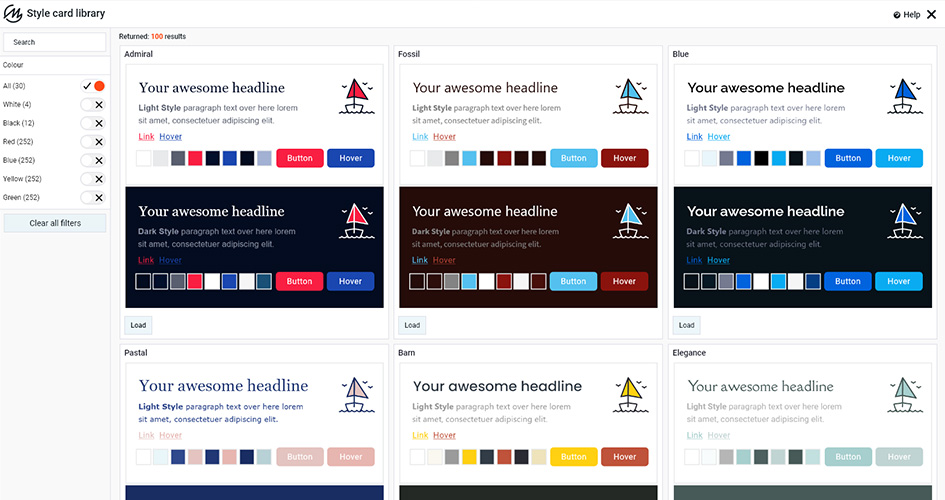
To add a unique touch to your web pages, consider using the available quick personalization techniques. By using a style card, you can easily modify up to thirty different style elements throughout your website. These include colours and tones that define your aesthetic, fonts used in your text, as well as subtle enhancements such as links and hover effects that significantly improve the user experience.
What is a maxi block Style Card?
The Maxi Blocks plugin offers the Maxi Blocks Style Card, which allows you to modify up to thirty visual elements with ease. This feature can transform your website’s appearance to align with your brand image. With 100 different style cards, you can find a design that suits your needs and switch between them as you wish. The Style Card expedites the design process for both novices and seasoned designers, making it an invaluable asset.
Responsive Design in the Gutenberg template library
Modern web design demands a crucial feature called responsive design. It guarantees that the layout and content of your website adapt automatically to fit the screen size and orientation of the device it’s viewed on. Consequently, your website will appear at its optimal appearance regardless of whether the user is browsing on a desktop computer with a large 4K monitor, tablet or mobile phone.
Here’s how Maxi Blocks supports responsive design:
- Flexible Layouts: The Maxi Blocks templates have been developed to offer flexibility in their design. They can easily stretch to occupy a wide desktop screen or shrink to adjust on a compact mobile screen, guaranteeing that your content is always effortless to peruse and explore.
- Adjustable Content: Your block’s content, such as text, images, and buttons, can adapt to different screen sizes. This means that the text may adjust its flow to fit narrower screens while images can be resized or repositioned for the best viewing experience.
- Device-Specific Customizations: Certain systems offer the flexibility to customize settings for individual devices. For instance, you can opt to display or conceal specific sections depending on the device, or you may modify the dimensions of your text or visuals to suit smaller screens.
- Testing Tools: Various platforms, such as WordPress, offer features that enable you to preview your website’s appearance on different devices. This feature can assist you in guaranteeing that your website appears visually appealing and functions efficiently, regardless of the device used to access it.
By implementing responsive design, you can offer an improved user experience to all your website visitors, regardless of the device they are using. This can lead to increased engagement, lower bounce rates, and enhanced search engine rankings for your site.
Maxi Blocks uses Flexbox WordPress templates
The Flexible Box Layout, commonly known as Flexbox, is a CSS layout model that enables effortless adjustments of box dimensions and alignment within a container. This feature is especially beneficial in crafting designs that can adapt to various screen sizes, thus producing responsive layouts.
Maxi Blocks’ WordPress templates use Flexbox to simplify block positioning and arrangement. This allows for easy modification of block order, alignment, and distribution within the container.
Here are some of the benefits of using Flexbox:
- Alignment: Flexbox simplifies vertical and horizontal alignment of blocks in a container. It’s particularly helpful for centring text or aligning images.
- Ordering: Flexbox allows you to rearrange blocks within a container, which is useful for creating various layouts for different screen sizes. For instance, an image may appear to the right of some text on a desktop screen but above it on a mobile screen.
- Flexibility: Flexbox is a flexible tool that allows blocks to expand or shrink to fit available space. It’s perfect for creating responsive designs that adapt to different screen sizes.
- Simplicity: Flexbox is a simple and straightforward layout model that is easy to learn and use. It can help you save time and effort in your web design process compared to other models.
Maxi Blocks uses Flexbox in its WordPress templates for more flexible and responsive designs. This ensures your website looks great on all devices.
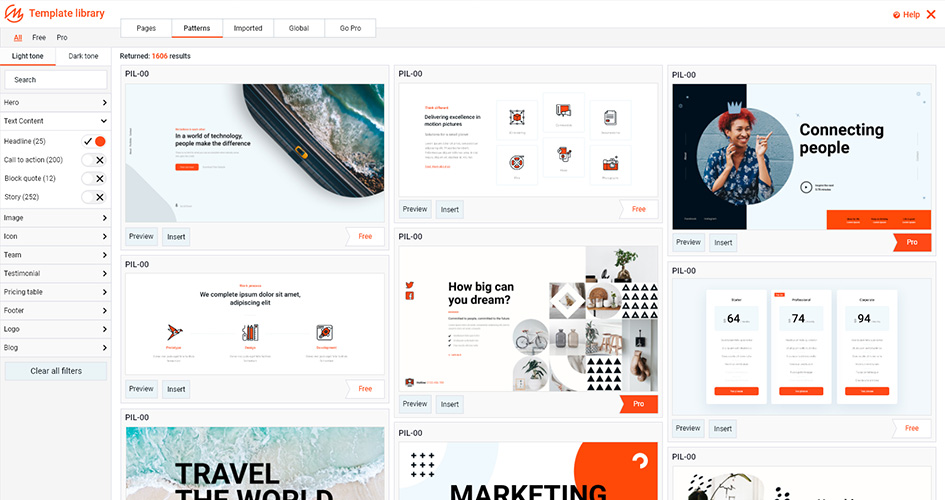
Pattern Design Library
Maxi Blocks’ Pattern Design Library is a vast collection of 1500+ pre-designed website pages and patterns. These pre-made sections can be added to your pages or posts, including different combinations of Gutenberg blocks.
Here’s how you can use them:
- Browse the Library: Find the perfect pattern or page for your needs by browsing through the Pattern Design Library. It offers a variety of designs for different content types, including headers, footers, product showcases, contact forms, and more.
- Insert a Pattern: Once you discover a pattern that appeals to you, simply select it and hit “Insert” or “Add” to easily incorporate it into your page or post.
- Customize the Pattern: After inserting the pattern, you can customize it to fit your needs. This might involve changing the text, replacing images, adjusting colours, or even adding or removing blocks.
- Repeat as Needed: You have the freedom to incorporate as many patterns as necessary to construct your page or post. For instance, you might choose one pattern for your header, a different one for your main content, and another for your footer.
The Pattern Design Library allows users to efficiently produce polished pages and posts without starting from scratch. This feature is particularly beneficial for individuals who are new to web design or have a substantial amount of content to generate, as it significantly reduces the time and effort required.
Integrated SVG Design Library
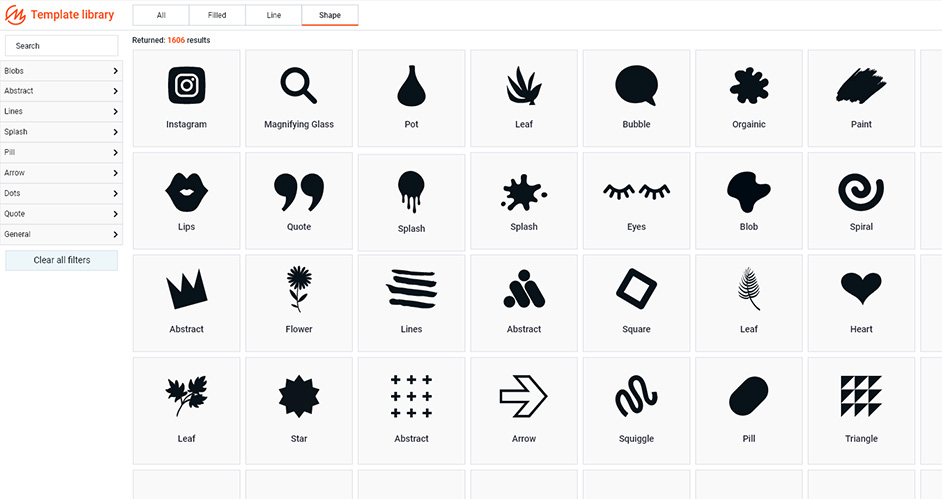
Maxi Blocks offers an Integrated SVG Design Library comprising more than 13,000 SVG icons and shapes that can be incorporated into website designs. SVG, which stands for Scalable Vector Graphics, is a vector image format designed for two-dimensional graphics. It enables interactivity, animation, and preview capabilities, making it a versatile choice for web design.
The Maxi Blocks plugin incorporates the library directly into its functionality, granting users seamless access to the extensive collection of icons and shapes within the WordPress editor during website construction and editing.
The icons and shapes offered by the library are highly customizable. Users have the ability to modify their colours, lines, and fills in real-time, allowing for seamless integration with the site’s overall design and colour palette.
With a diverse range of icons and shapes, the library provides ample flexibility for creating various designs. Whether it’s a button icon, a background shape, or a decorative element for headers, the Integrated SVG Design Library is likely to offer a suitable option.
By utilizing this feature, users can save significant time and effort, eliminating the need to create these elements from scratch or search for them elsewhere. Additionally, the SVG format ensures that these elements retain sharpness and clarity regardless of size or device, enhancing the overall visual experience.
Drag-and-Drop Editing
Maxi Blocks offers an intuitive interface with drag-and-drop editing capabilities, enabling users to effortlessly add elements to their pages and posts by simply dragging them from the menu and dropping them into the desired locations.
Real-time editing is a standout feature, allowing users to witness immediate visual changes as they make adjustments to their pages. This feature facilitates seamless experimentation with different designs and enables precise fine-tuning until the desired appearance is achieved.
To assist users in getting started, Maxi Blocks provides a selection of templates, including a template kit and starter templates. These templates come with pre-designed layouts that can be easily customized to suit individual needs, empowering users to create visually striking websites. The template collection is regularly updated, ensuring a continuous supply of fresh and diverse designs to choose from.
Importing these templates into a WordPress site is a breeze, requiring just a simple click of a button. All templates are readily available in the WordPress repository, streamlining accessibility and installation processes.
With its drag-and-drop editing functionality and extensive template library, Maxi Blocks simplifies the creation and customization of professional-looking websites. Regardless of expertise level, both beginners and experienced web designers can effortlessly craft stunning websites using these features.
Maxi Blocks are templates for WordPress Gutenberg that offer a range of design options and features to enhance the functionality and appearance of your website.
Maxi Blocks Gutenberg templates refer to pre-designed layouts that are compatible with the Gutenberg editor in WordPress. With the introduction of the Gutenberg editor in WordPress 5.0, users can now create content using a variety of blocks, such as text, images, headings, quotes, and more. These blocks can be customized and arranged individually to construct unique page or post layouts.
A Gutenberg template, in this context, is a pre-arranged configuration of these Gutenberg blocks. These templates serve as a convenient starting point for users when creating pages or posts, as they eliminate the need to design a layout from scratch. This feature is particularly beneficial for users who are new to WordPress or have limited design experience.
Gutenberg templates can be generated and saved by users themselves or provided by WordPress themes or plugins. Themes and plugins often offer libraries of Gutenberg templates, providing users with a selection of pre-designed layouts to choose from. These template libraries cover a wide range of styles and use cases, offering users a diverse range of options for their website designs.
Advantages of utilizing the Maxi Blocks add-on
Maxi Blocks Gutenberg templates in WordPress offer numerous benefits, particularly for individuals with limited web design experience or those aiming to streamline their content creation process. Here are some key advantages:
- Time-saving: Using pre-designed Gutenberg templates can save time when creating new pages or posts. Customizing a template is faster than starting from scratch.
- Consistency: Maxi Blocks templates help businesses maintain a consistent brand image across their website. This is especially useful for presenting a unified visual identity on different pages and posts.
- User-friendly: Maxi Blocks templates are beginner-friendly and easily accessible. The user-friendly Gutenberg editor’s block-based approach, combined with templates, simplifies the creation of professional-looking content.
- Customizability: Templates offer a pre-designed layout that’s fully customizable. Users can easily personalize the elements to align with their brand or style by adding, removing, or rearranging them.
- No coding required: Maxi Blocks Gutenberg templates are ideal for small business owners, bloggers, and others looking to create professional-looking websites without coding knowledge. They eliminate the need for developers, making them an excellent choice for establishing an online presence.
- Variety: Gutenberg offers thousands of templates suitable for various styles and use cases. Whether it’s a blog post, product page or contact form, there’s always a template that meets specific requirements.
- Responsive design: Maxi Blocks Gutenberg templates are responsive, providing a visually pleasing experience on desktop computers and smartphones.
Maxi Blocks Gutenberg templates enable users to create professional-looking content without coding expertise. This helps maintain consistency and streamline content creation.
Begin with the pre-set Maxi Blocks Gutenberg templates
To get started with Maxi Blocks and its Gutenberg templates, follow these steps:
- Download and Install the Plugin: To install the Maxi Blocks plugin, visit the Maxi website or WordPress plugin directory, download the plugin, and save it to your computer. Upload the plugin file in your WordPress dashboard under “Plugins” > “Add New” > “Upload Plugin.” Install and activate the plugin by clicking “Install Now” and “Activate.”
- Access Maxi Blocks: Access the Maxi Blocks features and functionalities by clicking the “Maxi” menu item in your WordPress dashboard after plugin activation.
- Browse the Template Library: Maxi Blocks offers a library of pre-designed Gutenberg templates. Browse through the templates to find one that suits your specific needs and design preferences.
- Import a Template: After selecting a template, look for the “Import” or “Use Template” button associated with it. Click on it to start the import process. The steps may vary slightly depending on the plugin version or interface.
- Customize the Template: Customize your imported template using Maxi Gutenberg editor. Add, remove or rearrange blocks as needed. Modify individual block designs to align with your brand identity or personal style.
- Publish Your Page or Post: To make your page or post live on your website, click the “Publish” or “Update” button once you’re satisfied with your customized template.
Q1: What is Maxi Blocks?
A1: Maxi Blocks is a WordPress plugin that provides a collection of Gutenberg blocks and templates, offering users an enhanced editing experience and streamlined website creation process.
Q2: How do I install Maxi Blocks?
A2: To install Maxi Blocks, download the plugin from the Maxi website or the WordPress plugin directory. Then, go to your WordPress dashboard, navigate to “Plugins” > “Add New” > “Upload Plugin,” upload the Maxi Blocks plugin file, and click “Install Now.” Activate the plugin once the installation is complete.
Q3: Can I customize the Maxi Blocks templates?
A3: Yes, you can fully customize the Maxi Blocks templates. The templates provide a starting point, but you have the flexibility to add, remove, or rearrange blocks as needed. You can also modify the design and styling of individual blocks to match your branding or personal style.
Q4: Are the Maxi Blocks templates responsive?
A4: Yes, all Maxi Blocks templates are designed to be responsive, ensuring that your website will look great on different devices, including desktops, tablets, and smartphones.
Q5: Can I use Maxi Blocks with any WordPress theme?
A5: Yes, Maxi Blocks can be used with any WordPress theme. It seamlessly integrates with the Gutenberg editor, allowing you to enhance your content creation regardless of the theme you choose.
Q6: Can I create my own custom blocks with Maxi Blocks?
A6: Yes, Maxi Blocks provides the functionality to create custom blocks. You can design and save your own blocks for future use, adding more versatility and personalization to your website.
Q7: Are there regular updates and new features for Maxi Blocks?
A7: Yes, the Maxi Blocks plugin is actively maintained and updated by the development team. This ensures that you will receive regular updates, bug fixes, and new features to enhance your experience.
Q8: Is Maxi Blocks beginner-friendly?
A8: Absolutely! Maxi Blocks is designed to be beginner-friendly, with an intuitive interface and drag-and-drop editing capabilities. It is suitable for users with varying levels of web design experience.
Q9: Can I use Maxi Blocks on multiple websites?
A9: Yes, you can use Maxi Blocks on multiple websites without any limitations. Once you have the plugin installed, you can leverage its features across all your WordPress sites.
Q10: Is there customer support available for Maxi Blocks?
A10: Yes, Maxi Blocks offers customer support to assist users with any inquiries or issues they may encounter. You can reach out to the support team for guidance and assistance in maximizing your experience with the plugin.
- https://wordpress.org/plugins/maxi-blocks/
- https://maxiblocks.com/home-page-coming-soon/
- https://maxiblocks.com/demo/
- https://maxiblocks.com/go/roadmap
- https://maxiblocks.com/go/help-desk
- https://maxiblocks.com/go/wordpress-plugin-changelog
- https://maxiblocks.com/go/maxi-discord
- https://twitter.com/maxiblocks
- https://maxiblocks.com/go/github-maxi-blocks
Others about MaxiBlocks
Read the 2025 Website Planet interview:
Inside MaxiBlocks: How a Free Gutenberg Builder is Redefining WordPress Design